Free Alien and Home Interior
Free Alien and Home Interior


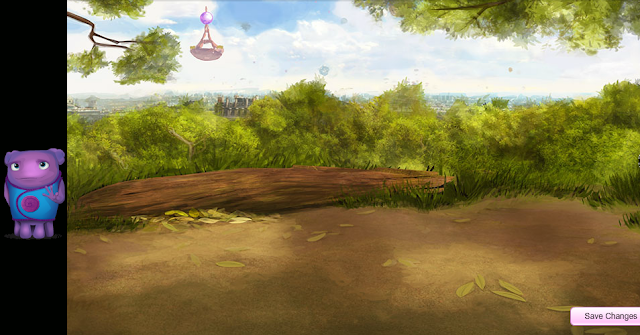
If you are on USA - Log in, Go to your Album and Click on the alien on left side of page, that's it.
If you are on any other country, I would not advise using proxies. But if you wish to-
Follow these steps:
1)Go to any USA proxy like -
webproxy.to/ OR uk-proxy.co.uk OR dontfilter.us/ OR bypassthe.net/
2)Copy&Paste or Type link to stardoll on the white bar
http://stardoll.com/en/
3)Click Go or Press Enter on your keyboard
4)Stardoll page should load, Log in stardoll
5)On proxy's link bar now paste link to album
http://www.stardoll.com/en/user/album.php
6)On left side you should see the alien, click on him
You should be redirected to campaign page and receive both - alien and interior
7)Log out by pasting this link on proxy's URL bar - stardoll.com/do/logout.php
8)Close the proxy page and Go to stardoll as usual
Alien should be in a campaign bag in your suite and Interior should be on Room Settings =)

Free March Madness Necklace

Free March Madness Necklace!

1)Log in stardoll.com/ within this week (till Saturday)
Necklace should be in a campaign bag in your Beauty Parlor =)

*Seemingly each week of March we will receive a free item just for logging in stardoll

(no proxy) Free Wool Bustier


SAFE TO GET without breaking any rules as i doesn't require proxy
1)Log in stardoll and Visit this page:
-If you get redirected to your suite 
You should have it in a pink giftbox in your suite [:


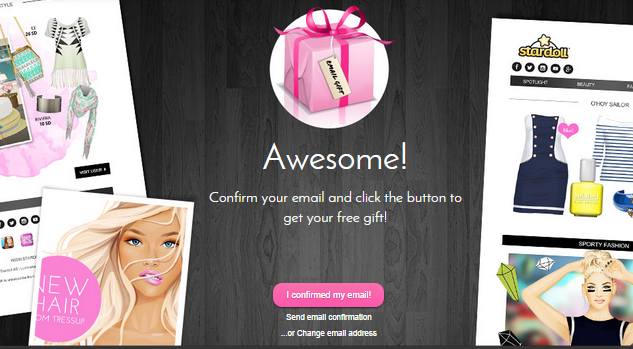
-If you get redirected to this page - it means you haven't connected an e-mail to stardoll. To do it:


2)Open another tab and Log in your e-mail*.
(You should have an e-mail somewhere, if you don't or don't remember the password, create a new one on gmail/yahoo/hotmail or somewhere else, log in)
3)Go back to stardoll's tab, Go to Settings and Click on Change e-mail address option
4)Write your (new) e-mail address and Click Sign me up button
5)Click Continue
6)Open e-mail's tab and Wait for e-mail from Stardoll
7)Open it and Click on where it says Confirm your e-mail
8)Visit the written above link again
You should be redirected and the scarf should be in a pink giftbox in your suite [:
<!-- SCM Music Player http://scmplayer.net -->
<script type="text/javascript" src="http://scmplayer.net/script.js"
data-config="{'skin':'skins/scmPurple/skin.css','volume':100,'autoplay':false,'shuffle':false,'repeat':1,'placement':'top','showplaylist':false,'playlist':[{'title':'Pitbull Ft. John Ryan - Fireball ','url':'https://www.youtube.com/watch?v=7ztENhDCmu8'},{'title':'Jason Deroulo Wiggle','url':'https://www.youtube.com/watch?v=HwsneFjMnj4'},{'title':'Bang Bang! Jessie J Ft Ariana Grande & Nicki Minaj ','url':'https://www.youtube.com/watch?v=hCCOWMej4R4'},{'title':'Taylor Swift - Shake It Off','url':'https://www.youtube.com/watch?v=nfWlot6h_JM'},{'title':'Ariana Grande - Problem ft. Iggy Azalea','url':'https://www.youtube.com/watch?v=iS1g8G_njx8'},{'title':'Katy Perry - This Is How We Do','url':'https://www.youtube.com/watch?v=7RMQksXpQSk'},{'title':'Katy Perry - Birthday','url':'https://www.youtube.com/watch?v=jqYxyd1iSNk'},{'title':'Katy Perry - Part Of Me','url':'https://www.youtube.com/watch?v=o94S5Qw17YE'},{'title':'Demi Lovato ft. Cher Lloyd - Really Don%27t Care ','url':'https://www.youtube.com/watch?v=w7LbW9sXQ5s'},{'title':'Cher Lloyd - Want U Back ','url':'https://www.youtube.com/watch?v=LPgvNlrBfb0'}]}" ></script>
<!-- SCM Music Player script end -->

Free Keep Me Warm Scarf

Free Keep Me Warm Scarf


1)Log in stardoll and Visit this page:
-If you get redirected to your suite - you should have it in a pink giftbox in your suite [:

~~~~~~~~~~~~~~~~~~~~~~~~

-If you get redirected to this page - it means you haven't connected an e-mail to stardoll. To do it:


2)Open another tab and Log in your e-mail*.
(You should have an e-mail somewhere, if you don't or don't remember the password, create a new one on gmail/yahoo/hotmail or somewhere else, log in)
3)Go back to stardoll's tab, Go to Settings and Click on Change e-mail address option
4)Write your (new) e-mail address and Click Sign me up button
5)Click Continue
6)Open e-mail's tab and Wait for e-mail from Stardoll
7)Open it and Click on where it says Confirm your e-mail
8)Visit the written above link again
You should be redirected and the scarf should be in a pink giftbox in your suite [:

*I SUGGEST MAKING A REAL, WORKING EMAIL, which's password you'll remember
because in case something happens with your stardoll account (can't log in/account's deleted or hacked), you will be able to get it back by writing to stardoll staff

Free Facebook Likometer Clothes and Accessories + 5 Free Stardollars

Free Facebook Likometer Clothes and Accessories + 5 Free Stardollars


These freebies are available only if you have a Facebook. I suggest creating a spare profile:
(1)Create a new e-mail (for example on gmail.com); then 2)Sign up on Facebook.com with it)
BUT you can use an already existing one.

FIRST - CONNECT STARDOLL WITH FACEBOOK
1)Log in your newmade or old Facebook.com profile
2)Open a new tab and Go to stardoll.com and Log in
3)Go to stardoll's Settings:
http://www.stardoll.com/en/account/index.php?show=settings
4)Scroll down and click -Connect to Facebook-
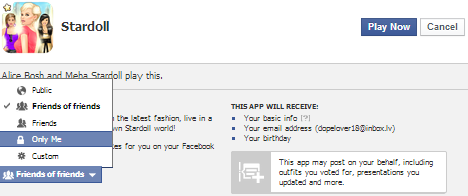
This should show up

5)Edit the settings to ''Only Me'' and Click -Play Now- button

SECOND - PICK ITEMS FROM FACEBOOK APP
6)Go to your Facebook.com and "Like" Stardoll's Facebook page:
http://www.facebook.com/Stardoll
7)Then Click on Free Gifts App or Copy&Paste this link:
https://www.facebook.com/Stardoll/app_190322544333196
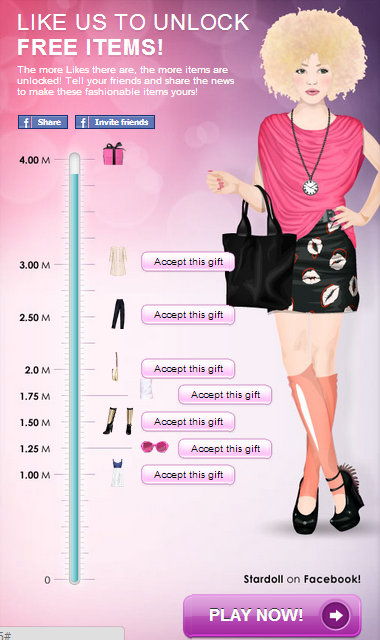
This should show up

8)Click -Accept this gift- button for the item(s) you want to receive
(I suggest "right-click -- open in new tab" for each item OR re-visit the app page for each)
When you have ''accepted'' items you want, Go to Stardoll
Items should be in Thumbs Up bags in your suite [:

*When stardoll reaches 4 million likes, another gift will be released


---Limit sharing all stardoll activities on Facebook, Go here:
https://apps.facebook.com/stardoll_feed/?type=accountSettings&show=settings&lang=en
---To unconnect stardoll from Facebook, Go here:
https://www.facebook.com/settings?tab=applications
(Click x to remove it)

IF YOU NEED some extra info or briefer version - feel free to comment your questions.
I tried to be descriptive, but whole process is actually very fast =]

New Polished shop in Stardoll

New Polished shop in stardoll

Let's take a look of this new shop in stardoll.com

To visit it Click on the pictures! =]